New chinese iPhone

iPhon3N3wz

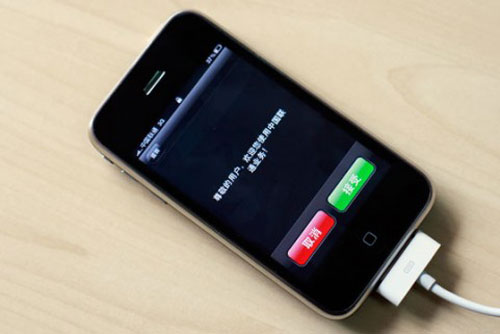
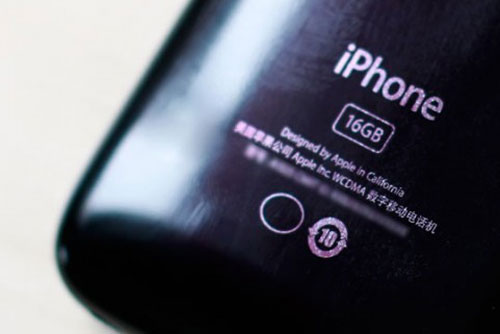
An specific china-iPhone carrying model number A1324 have receive a five year approval on China's State Radio Regulatory Commission on May 7th. The iPhone hardware will appear on china's unicom network. The phone operates on the 900MHz, 1700MHz and 1900MHz bands. It seems that the iPhone does not have WiFi capabilities.

Some of the picture published on the internet show a 16GB 3g iPhone.
iPhone firmware 3.0.1 to fix sms security problems

iPhon3N3wz


Today Apple just release a new firmware for the iPhone which fixes the vulnerability of the SMS hack. As we already know the SMS vulnerability could of allowed hackers to hack iPhone via text. The problem was addressed yesterday in the Black Hack Cybersecurity conference in Las vegas. The firmware 3.0.1 seems to be only a patch to fix the security problems. Apple as posted a summery of the 3.0.1 on the Apple site. It looks like the problem was really serious since apple acted so fast. Lets hope that this really fix the problems so we all can be worry free.

Warning: Just a quick warning to all of you who has a jailbroken device. This close all the possibilities of jailbreaking your device. I will keep you updated.

GV Mobile


iPhon3N3wz

Here is a new really cool app for all iPhones that are jailbroken :) is called GV Mobile. The app is available throw Cydia, there is no cost right now for the app but if you really like it you can donate to the developer. It clearly said it on the description that this is not a product of Google.

Features:

-Dial numbers via the iPhone address book or typing on the keypad
-Full SMS support (view historic, reply, send new)
-Retrieve and delete recent call history
-Playback and delete voice mails
-Take calls from different phones other than your iphone
-Enable or disable the phones that Google voice forwards calls to
-Add or delete phones that Google Voice forwards call to.

The app looks really cool i am going to give it a try :)

Security flaw found on iPhone


iPhon3Newz

A group of cybersecurity researchers are planning to unveiled a security flaw on the iPhone which let hackers take control of the phone via SMS.

The two guys who found this are planning to unveil it at the black hat conference in Las Vegas today. They told Apple a month ago about the security flaw but Apple have done nothing to fix it yet. Will they fix it?

To prevent your phones from being hacked if you ever receive a text containing a single square character turn your phone off quickly. That will stop your iPhone from getting hack.

Apple should do something soon before we all have hack iphones going crazii.

Stunning nano-phone under development

Stunning nano concepts in development at apple. This are some of the photos i have gathered. It looks like they making some kid of new nano phone with controls on the back. It looks pretty cool. It has the normal look of a nano with a touch of an iphone :)


Apple adds keywords to App Store additions


This week Apple took a step forward to making iPhone and iPod touch apps in the apple store easier to find. Now developers could add comma-separate keywords to their apps, up to 250 characters that's a lot :).

There are too many apps in the apple store and we all now that it needs much more improvement in order for iPhone and iPod touch users to find the app they want. Hopefully this will make it a bit easier.

Apple Releases MobileMe iDisk Application for iPhone


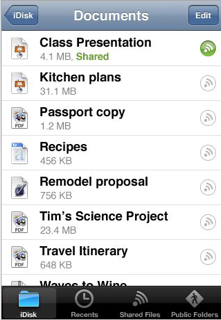
Apple MobileMe has finally release iDisk application for iPhone and iPod touch users. The application was originally announced July during apple's worldwide conference. iDisk offer users the ability of accessing files they MobileMe contacts have stored on apple service. You can also stream audio and video without any restrictions, view files on landscape of portrait view, your log-ins are save between sessions so you wont have to re-enter your username and password, and you can view files your friend have store online if you know their MobileMe user name.

Now for the bad parts of this application they are no visuals previews of what videos, photos, or doc it contains. There is no way to save files for offline viewing :(. copy and paste does not work what a let down :(. also as soon as new files need more space old files will be deleted.

Steve Jobs vs Dev Team jailbreaking battle

This video is mad funny i though some of you guys would enjoy it as i did :) who would win the battle there is only one way to find out :)

Having trouble finding where you park the car?


Did you ever had trouble remembering where you parked your car? it is very frustrating i know but with this iPhone 3g app you won't even have to worry about about remembering where you park the car. Let the iPhone take you exactly where you park the car is very simple. The name of the application is G-Park and you can find it on the apple store! take a look at this:

1. Park your car and hit the 'Park me!' button.
2. Add a Photo and notes about your parking space.
3. Get lost
4. Hit the 'Where Did i Park?' button. Choose 'Directions' for turn-by-turn directions that will take you right back to your car. Choose 'Exact Location' to pinpoint your car.

Sounds good doesn't it? This G-Park as an easy interface which lets you take a pic of the spot you parked you can also enter notes that you will want to remember. This application only cost $0.99 on the apple store it is only for the iPhone 3g and iPhone 3gs. So from now on let the iPhone do the remembering park you just enjoy your day without worries!.

iPhone 3g s iBEC and iBSS files guide

Hello everyone
In this short guide i am going to be showing you how to save your iPhone 3g s iBEC and iBSS files. The iBEC and IBSS files are really important for you to have if you are planning on jailbraking your device now or when apple updates the iPhone firmware. The Dev Team and GeoHot already said it was essential for everyone to save this files to use with their tools. When iTunes starts the restore process, they contact Apple servers to generate signatures just for your device. It’s important you get these signatures for your phone before a new version of the software comes out. ” And to eliminate this limitation you have to generate a unique certificate for your phones iBSS and iBEC.

This process of grabbing the iBEC and iBSS files is very
long but i found a great tool which will help us do it quick. This tool is an IBEC and IBSS grabber which you can download it directly from here. This is the shortest and best method to use.
Follow this instructions:

1. First select the location where you will want you files to be save at.
2. Click on the Start Watching Button.
3. To obtain the iBEC files you will have to connect your iPhone 3g s to the computer, open up itunes, hold the Shift key on your keyboard, hit restore and look for the iPhone 3g s firmware which you should have it downloaded on your computer. Watch the iPhone 3g s restore while doing this the iBEC and iBSS grabber will save the iBEC files to your computer.

4. When the iPhone 3g s is done restoring iTunes will ask you if you want to restore from back up or set up as new. If you don't want to lose any of your information then just restore from back up.

5. Now is time for you to grab the iBSS files certificate. For this you will have to put your iPhone 3g s on DFU Mode so we can restore the iPhone 3g s one more time. So put your iPhone 3g s on DFU Mode once is done iTunes will pop up saying your device is on recovery mode. Once again hold down the shift key and hit restore then find the iPhone 3g s firmware and wait for the iPhone 3g s to restore. Once is done you should have both the iBEC files and the iBSS files in the location you selected to save them.

6. It is really important for you to keep this files safe if you are planning on jailbreaking your device each time the new firmware comes out. My advice will be to save this files on a flash drive so you won't lose them.

Thanks for reading i hope this was helpful for you guys.

To check some news and cool stuff please visit this page.